


 Featured Guide
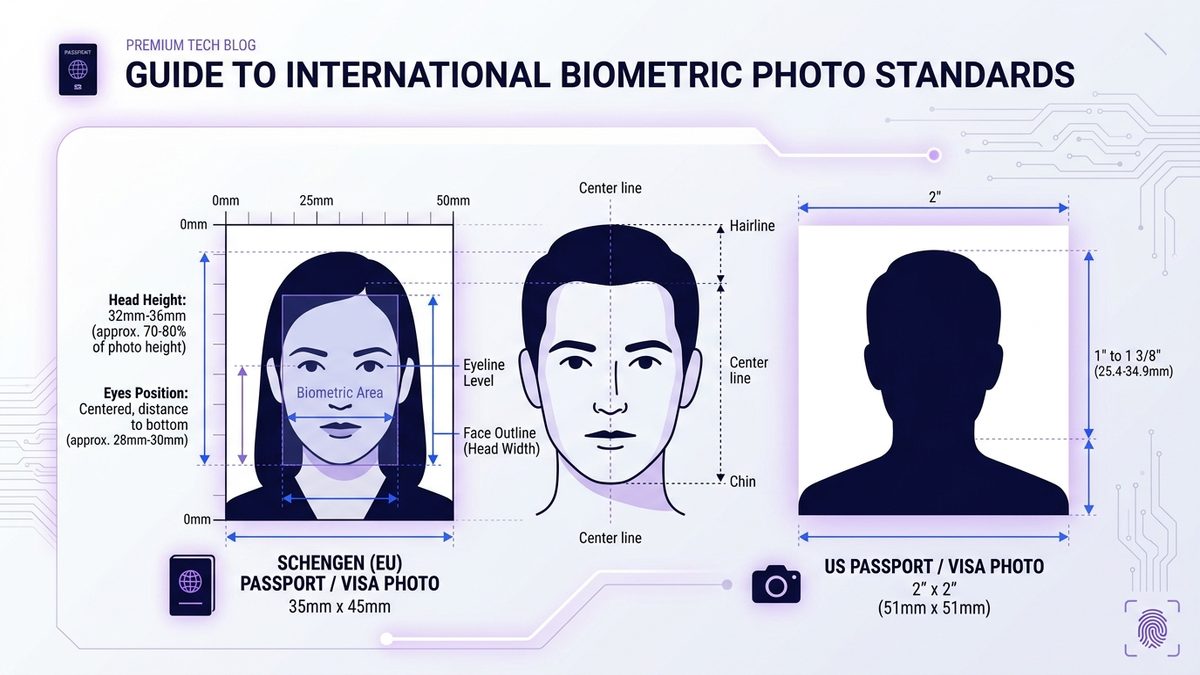
Passport & Visa Photo Size Guide: Dimensions in mm, Inches & Pixels (300 DPI)
Convert common photo print sizes into pixels at 300 or 600 DPI, compare print and digital requirements, and resize with a browser tool.
Clear, practical instructions for working with PDFs, images, text, and career documents.
Featured Guide
Convert common photo print sizes into pixels at 300 or 600 DPI, compare print and digital requirements, and resize with a browser tool.
Combine reports, scans, receipts, or forms into one cohesive PDF. Master page ordering, mixed orientations, and client-side security.
PDF guidesReduce PDF file size to meet strict portal and email limits while keeping text razor-sharp and images legible.
Career documentsBuild a focused, high-converting resume with measurable achievements, ATS-compliant formatting, and clean PDF export.
PDF guidesExtract specific pages, isolate custom intervals (e.g. 1-5, 8, 12-15), or burst multi-page documents into individual files with zero file uploads.
Career documentsConnect job requirements to proven accomplishments, craft a compelling narrative, and export a polished PDF letter.
PDF guidesConvert DOCX and DOC files to PDF online, preserve tables and page breaks, check font substitutions, and verify selectable text.
PDF guidesUnderstand the difference between digital text PDFs and scanned images, and know when OCR is needed.
PDF guidesCombine smartphone photos, receipts, and scans into a single organized multi-page PDF document entirely in your browser.
PDF guidesExtract pages from a PDF as crisp image files, choose suitable DPI settings, and download single pages or ZIP archives.